
Play Poople Unlimited Practice
Independent practice using our own supported word list. Nothing here changes your official Poople score.
Practice controls become available when JavaScript loads. If they remain disabled, reload the page; the text guide below is still available.
ENABLE 2K independent list · 3,919 words
Current word
Target POOP
Active time: 0:00 · paused while this page is hidden
Save or load on this device
Saving is optional and explicit. Load replaces the on-screen round with your last saved snapshot; it never restores automatically.
No progress is saved until you select Save round.
Choose a Difficulty and Start a Ladder
Choose a Difficulty
Leave the optional starting word blank to choose a random round. Easy starts have a shortest distance of two or three moves, Medium starts four or five, and Hard starts six or more. The distances come from this page's actual word graph. After loading, each option shows its number of available starting words; an empty group would be disabled rather than filled with invented puzzles.
Start a New Word Ladder
Select Start new round to begin. The opening word is displayed above your ladder, and the fixed target is POOP. Random selection avoids immediately repeating the previous start when the difficulty has another option. A custom word overrides the difficulty selection, so ROMP is still a short custom round even if Hard is selected.
Custom starts must be supported and connected to POOP. GOOP provides a one-move example; entering POOP starts an already-complete zero-move round. These are useful checks, not daily puzzle claims. Changing a setup field does not interrupt the current ladder: the new setting applies only when you start another round.
Make a Valid Move
Change Exactly One Letter
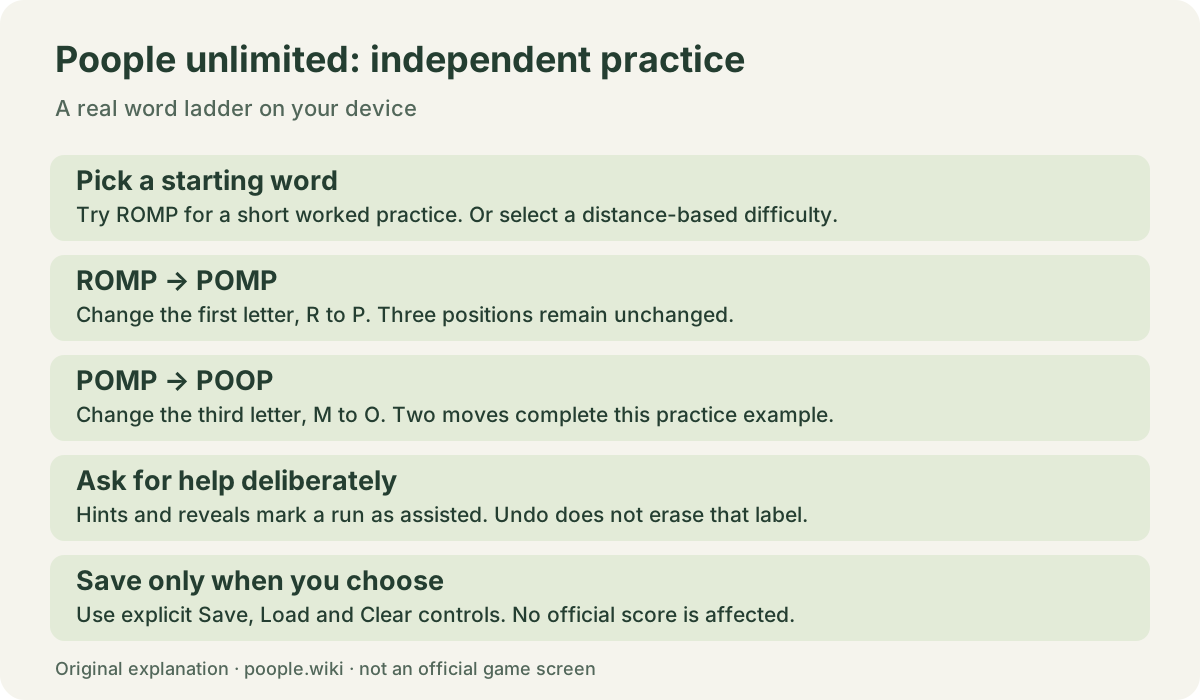
Enter a new four-letter word and select Make move, or press Enter. Three positions must remain identical. For example, ROMP to POMP changes the first letter, and POMP to POOP changes the third. ROMP directly to POOP is rejected because two positions change. Inserting, deleting or rearranging letters is not a valid move.
Check Words in Our Practice Dictionary
A spelling must also exist in the supported list. The tool distinguishes a word outside the list from a supported word that changes too many letters. Re-entering the current word does nothing. Invalid attempts leave the board and move counts unchanged, with an explanation beside the input. Lowercase letters and surrounding spaces are normalized.
You may return to a previously visited word through a valid move, although doing so can lengthen your attempt. Every accepted step is shown with its changed position. This makes the ladder readable without relying on tile colors. The current ladder's move count equals its number of transitions, not the number of displayed words.
Undo, Restart and Get Help
Undo Without Losing Your History
Undo last move removes the latest transition from the current ladder. It can also reopen a completed round. The separate accepted-moves-tried counter remembers earlier valid attempts, including undone steps. Restart same round returns to the original word while retaining that counter, active time and any help marker. Start new round creates a separate attempt with fresh counters.
Hints, Reveals and Assisted Runs
The first hint identifies a letter position to consider and reports the shortest remaining distance. A second, stronger hint gives one possible next word. Reveal remaining route shows a complete supported-list path from your current word; it does not automatically play those moves or mark the round completed.
Any hint or reveal marks the round Assisted. Undoing or restarting cannot erase that marker, and saving preserves it. A new accepted move clears the previous displayed hint so that it cannot be mistaken for advice about the new position. Help is optional: you can finish a round without requesting it.
How Practice Difficulty Works
Distance in a Fixed Word Graph
Each supported word is a vertex, and a legal one-letter change is an edge. A breadth-first search works backward from POOP to find minimum distances. Random rounds are selected only from reachable words in the requested range. The displayed starting minimum stays attached to that start; it does not change into the remaining distance after every move.
Difficulty describes distance, not a personal skill rating. A two-step route through an unfamiliar entry can feel harder than a longer route through familiar words. More than one shortest route may exist. When help selects among equally short routes, alphabetical tie-breaking makes the chosen example reproducible.
Why Another Dictionary May Give a Different Route
This game uses the same 3,919-entry ENABLE subset as our solver, not the official Poople word list. Adding or removing a connecting word can change a minimum or make a start unreachable. Read the practice dictionary to inspect supported words, one-letter neighbors and the source license. A result here is not proof of an official game's accepted route.
Practice Versus the Daily Poople Puzzle
Independent Rounds and Official Daily Play
These rounds are generated on your device and do not wait for a daily reset. They have no official puzzle number, leaderboard, streak or shared score. The tool does not send moves to the official Poople game. Read the daily Poople rules when comparing the two experiences.
For help with an actual daily puzzle, match its starting word before opening today's hint status or the checked answer status. A random practice round is never labeled as today's official solution. The practice timer measures visible-page time while a round is active and pauses when the page is hidden; it is not an official speed record.
Saving and Resetting This Browser's Progress
Save round stores one snapshot in this browser, including the word path, dictionary version, counters and assisted marker. Later changes are not saved automatically. After refreshing, select Load saved round to restore that snapshot deliberately. Loading replaces the currently displayed round; it does not merge two attempts.
Clear saved round removes the stored snapshot and leaves the live board alone. Damaged or incompatible saves are rejected with an explanation, without changing your current round. Storage blocked or full? You can still play. Another tab changing the saved snapshot produces a notice, not a silent board replacement. Inputs and routes are not uploaded; see our privacy policy.
Improve Your Next Attempt
Notice Useful Neighbor Words
Before choosing a move, compare which position changes and what other words that spelling connects to. A letter already matching POOP is not always worth preserving: legal connecting words matter more than superficial similarity. Use the word-list tool to inspect neighbors when you want possibilities without a complete route.
Review a Finished Ladder
After reaching POOP, compare the active ladder length with the starting minimum. A longer valid path is still a completed attempt. Identify loops or branches you might reconsider next time. If you want a full worked path, review a route in the solver; opening that tool reveals more help than simply checking one word.
Watch an Independent Practice Round
Original illustrated walkthrough, not live gameplay recording. This 40-second video follows the teaching route ROMP → POMP → POOP, explains which letter changes at each step, and introduces assisted markers and optional local saves. English captions describe each illustration. To test the live tool yourself, reject ROMP directly to POOP, play POMP, undo, request a hint, then finish the round. Neither the illustration nor the tool changes an official score.
Choose your next word game
Want a different kind of puzzle after a ladder? Compare games like Poople by their actual actions: changing letters, guessing words, grouping clues, following semantic ranks or swapping tiles. The guide links to the official games and separates daily challenges from our independent practice.